
Coding Arduino C++ with Brian
Welcome! This is Brian's computer science and coding page for Arduino C++ and the Arduino microcontroller. This page contains resources for the upcoming 2025 - 26 school year.
During the upcoming school year, you’ll learn to write computer programs using Arduino C++ to control an Arduino Uno R3 microcontroller.
Through hands-on coding (called sketches), you’ll help digital computers interact with the analog world.
This class starts from the beginning and assumes no prior knowledge of electronics or coding.
You’ll build programs that read sensors (like temperature, light, and distance) and control outputs (like LEDs, motors, and relays).
In addition to coding and electronics, this class is an introduction to computer science, covering:
-
Programming fundamentals: functions, loops, conditionals, variables
-
Key concepts: binary numbers, Boolean logic, and libraries
-
Problem-solving skills: debugging techniques and common coding mistakes
There will also be frequent challenges during “off” weeks — perfect for returning students seeking a deeper experience.
By the end of this course, you'll have an excellent foundation to help you write your own programs.
[am4show have='p8;p9;p11;p38;p92;p161;' guest_error='Guest error message' user_error='User error message' ]
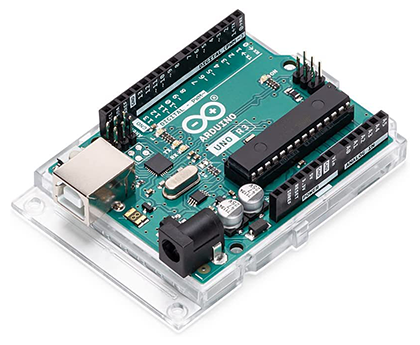
The Arduino Uno R3
In addition to the electronics parts, this course requires an Arduino Uno R3. Be sure that you order an Uno that is labeled "R3". (R3 stands for Revision 3).
You can add one to your kit order from FutureVision Research or you can purchase it separately:
Click here to order an Arduino Uno R3 from Amazon.
You will also need a USB-A to USB-B cable.
Getting Ready for Your Classes
Step 1.
Subscribe to Brian's class update email list through Substack.
Brian uses this email list to send updates throughout the year.
During the summer he provides information on kits.
During the school year, Brian sends information on class resources and upcoming projects.
Step 2.
Practice Touch Typing
Touch typing is an important part of coding.
Learn to touch type with this free service.
Note: Supercharged Science is not affiliated with TypingClub.
Step 3.
Order your supplies
This class requires:
- FutureVision Research Kit: Sensors, Motors, and More – Version 3
(or use the shopping list available on this page) - Arduino Uno R3, USB cable
- A Windows, Apple, or Linux computer
Watch this video for an explanation of the class schedule and required supplies.
Step 4.
Install the Arduino IDE* Program onto Your Computer
We'll use a program called "Arduino IDE" to upload programs to our device.
The Arduino IDE is available here: arduino.cc/en/software
*This year, we are using this "installable" version (instead of the cloud version that was used during the 2023 - 24 classes).
Step 5.
Watch the special class "Getting Organized and Preparing for Coding the Arduino with Brian."
Note regarding parts boxes (this will be addressed during the getting organized class):
As of August 2025, Harbor Freight has discontinued their Storehouse 10 Utility Box. However, Brian does have the 10 tray boxes in stock.
Therefore, if you purchase Brian's "Sensors, Motors, and More" kit for this class, you will have the option to add a 10-tray box to your order.
Boxes purchased from Brian will include “ready-to-cut” label cards to help you organize your parts. Alternatively, you can order the boxes directly from Harbor Freight and then purchase the cards from Brian, or print your own.
The links below provide printable labels for the 10-tray utility boxes. If you have the new 4 drawer boxes, please visit Unit 25 to download the proper labels.
Step 6.
Join Brian's Classes
This class occurs on Wednesday and Thursday every other week at 8:00AM (Pacific). Each session is approximately 60 minutes and includes time for Q&A, troubleshooting and interaction between Brian and the students.
Thursday classes will include up to an extra 30 minutes of discussion time.
All classes are on Zoom, and all recordings are posted to this page (below).
Each class covers different content, and the Wednesday/Thursday two-day format means that Part 1 is on Wednesday and Part 2 is on Thursday. Please make sure you attend all the sessions if you wish to make all of the projects.
Coding Arduino C++ with Brian classes are Wednesdays and Thursdays at 8:00AM on the following dates in 2025 and 2026:
Class discussions are Thursdays at 9:00AM (Pacific) after regular class.
2026 Dates
- February 18, 19
- March 4, 5
- March 18, 19
- April 1, 2
- April 15, 16
- April 29, 30
- May 13, 14
2025 - 2026 Resources and Videos
Sketches for this class are available here: github.com/FutureVision-Research/coding_arduino
Section 2 Resources and Videos
In this first class of Section 2, we learn how to install a library, how to copy a sketch from Github, and we build a circuit using our OLED display (Activities 1-3).
Homework: Build Activity 3 and confirm that the display works with the sketch oled_hello_world.ino. Then type in the sketch from scratch using the printout in Activity 3.
In this class, we build Activity 5 and learn how to use a photocell as an analog light sensor. We also learn about the functions map() and constrain().
In this class, we review questions that came up in Session 13. We then cover an overview of sensors and how they send information to a microcontroller. We wrap up by building Activity 9 – Using a US1881 Hall Effect Sensor.
Homework: Build Activity 6 – Arduino and TMP36 Temperature Sensor and use the provided sketch.
Reminder: There was a mistake in an early copy of the breadboard picture for this Activity. The TMP36 should be connected to 5V, not 3.3V.
Once the Activity is working. Type in the sketch from scratch by using the code example in Activity 6. Then build Activity 7, which creates a temperature readout using the OLED display.
In this class, we review Activity 6 and learn about the TMP36 temperature sensor. We also discuss an introduction to the PIR digital motion sensor.
Homework: If you haven’t done so, build Activity 6 – Arduino and TMP36 Temperature Sensor and use the provided sketch.
Reminder: There was a mistake in an early copy of the breadboard picture for this Activity. The TMP36 should be connected to 5V, not 3.3V.
Once the Activity is working. Type in the sketch from scratch by using the code example in Activity 6. Then build Activity 7, which creates a temperature readout using the OLED display.
In this class, we build Activity 8 and learn about the Passive Infrared Sensor. We also learn about control flow, conditional statements, and Boolean logic.
Homework: Type in the sketch from scratch using the example under Activity 8.
In this class, we build Activity 10 and learn how to use an ultrasonic distance sensor. We also learn how to modify sample sketches.
In this class we learn how to import a library from Github and how to use the ADXL345 accelerometer. We also learn more about I2C serial communication.
In this class, we learn more about baud rates and then begin a lesson on functions using Activity 13.
In this class, we continue our lesson on functions and then build Activity 14.
Homework: Have Activity 14 ready for the next class.
Book Recommendations from Brian
Programming Arduino: Getting Started with Sketches, Third Edition
by Simon Monk
This fully updated guide shows, step by step, how to quickly and easily program all Arduino models using its modified C language and the Arduino IDE.
Programming Arduino Next Steps: Going Further with Sketches, Second Edition
by Simon Monk
Take your Arduino programming skills to the next level using the hands-on information contained in this thoroughly revised, easy to follow TAB guide.